

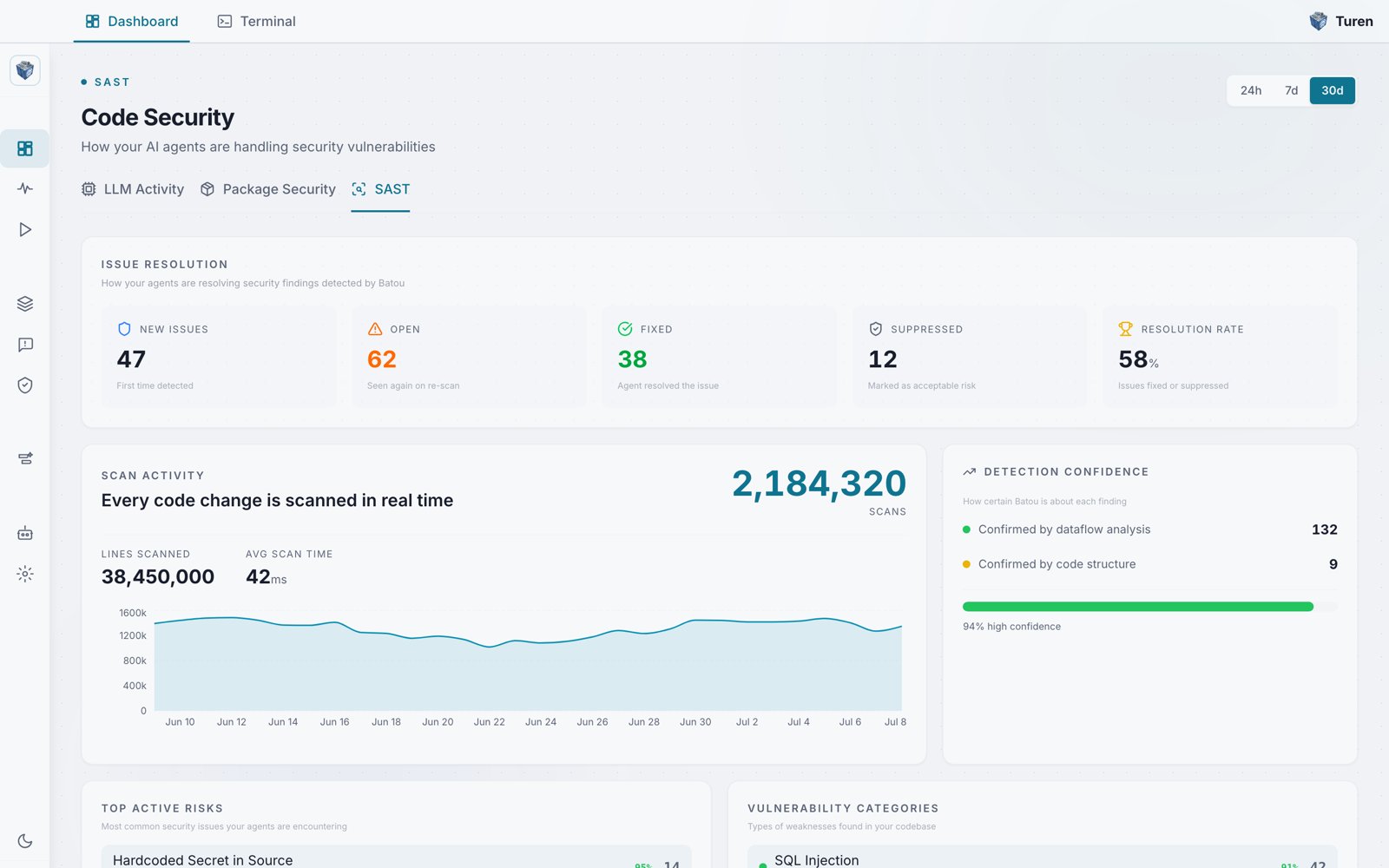
The SAST Code Security dashboard: issue resolution counts, real-time scan activity, and detection confidence.
How It Works
Batou runs as a Claude Code hook on every file write and edit:1
Code written
Claude Code creates or edits a file via Write, Edit, or NotebookEdit.
2
Batou scans
The hook sends the file content to the Batou engine, which runs pattern-based and semantic rules against the code.
3
Findings evaluated
Each finding is scored by confidence (how likely it is a real issue) and classified with a CWE identifier.
4
Decision made
Based on your organization’s thresholds, the finding either blocks the write (PreToolUse) or warns inline (PostToolUse).
5
Results reported
Scan results and findings are sent to the Turen platform for dashboard visibility and lifecycle tracking.
Where to Configure
Go to Agentic Security > Software Security (/security/software) and select the SAST tab.
Blocking Presets
Blocking presets control when Batou blocks a write vs. warns. Presets are based on confidence tiers:
Choose the preset that matches your organization’s risk tolerance. You can also disable individual rules from the dashboard.
Disabling Rules
From the SAST tab, expand any rule to see its details and toggle it off. Disabled rules are skipped during scans across all agents in your organization.Finding Lifecycle
Every Batou finding has a lifecycle status that tracks its resolution:
Lifecycle transitions are tracked over time and visible in the dashboard under Issue Resolution, which also shows an overall Resolution Rate.
Inline Suppression
To suppress a finding that is a false positive, add a comment above the flagged line:
Suppressed findings are reported to the dashboard with their suppression reason.
Dashboard
The SAST dashboard is available under Monitor > Dashboards and provides several views:Scan Activity
Total scans, lines scanned, and average scan time over your selected time range. Every code change is scanned in real time, and this view tracks scanning volume across your organization.Detection Confidence
How certain Batou is about each finding, broken down by how findings were confirmed (dataflow analysis or code structure), along with the overall share of high-confidence findings. Higher-confidence findings are more likely to be real issues.Top Active Risks
Surfaces the most common security issues your agents are encountering across your organization. Each row shows the issue name, a confidence percentage, and a count. Use this to prioritize remediation.Vulnerability Categories
Breakdown of findings by CWE category (e.g., CWE-79 XSS, CWE-89 SQL Injection), showing which vulnerability classes appear most frequently.Issue Resolution
Tracks how your agents are resolving findings: New Issues, Open, Fixed, and Suppressed counts, plus an overall resolution rate. Use this to measure your organization’s remediation velocity.Supported Languages
Batou scans files based on their extension. Currently supported:Claude Code Integration
Batou integrates with Claude Code via hooks configured automatically by the Turen agent. No developer setup is needed. The agent registers hooks on two event types:- PreToolUse: Scans before the write is applied. Can block the write if a finding exceeds the confidence threshold.
- PostToolUse: Scans after the write is applied. Provides hints to Claude Code about findings that didn’t meet the blocking threshold.