

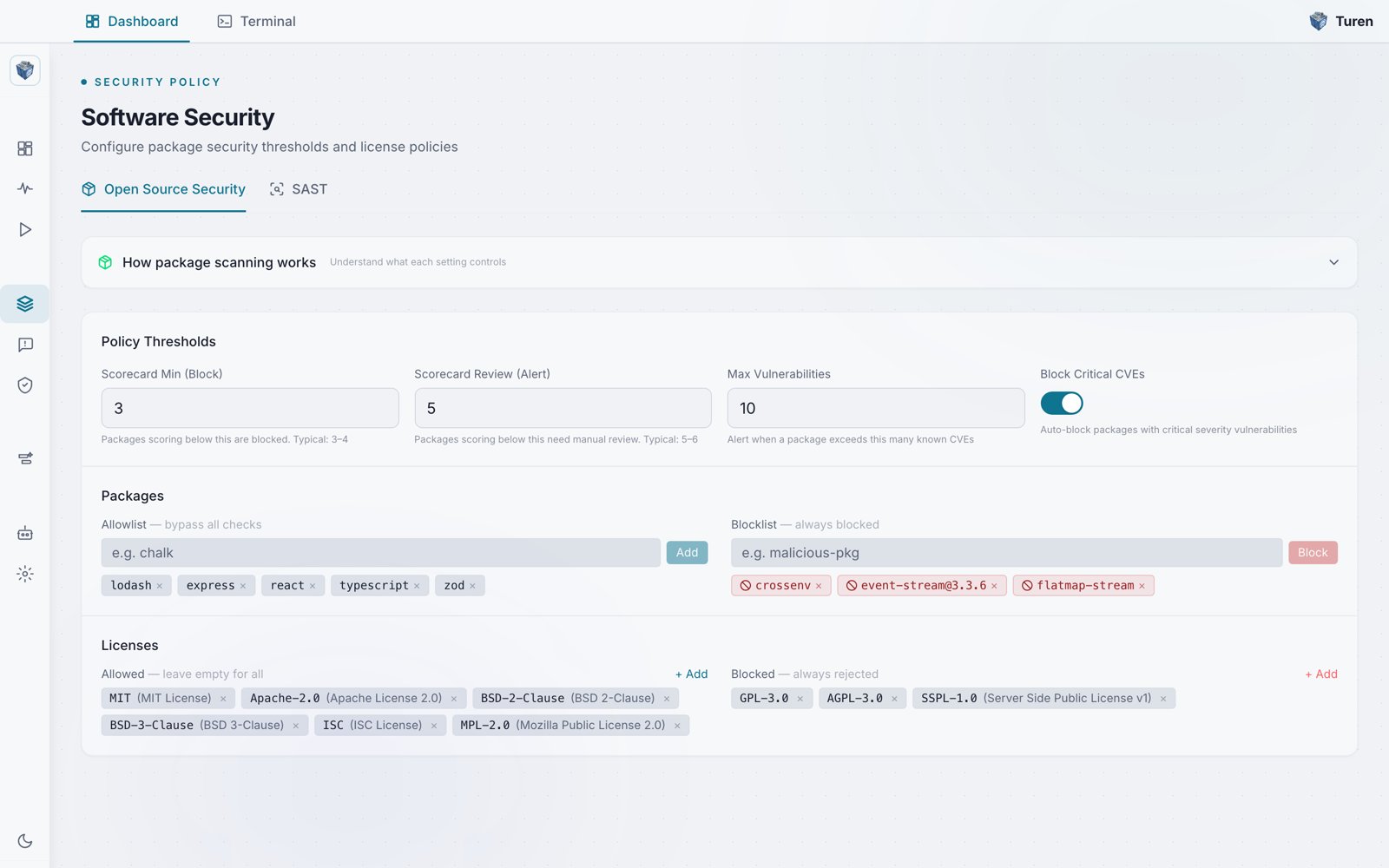
The Open Source Security tab of the Software Security page: scorecard block and review thresholds, max vulnerabilities, a Block Critical CVEs toggle, package allow and block lists, and allowed and blocked licenses.
Where to Configure
Go to Agentic Security > Software Security (/security/software). The page has two tabs:
Malware detection is always on and needs no configuration: packages with known malware advisories (MAL-*) are blocked automatically at CRITICAL severity.
To enable or disable package scanning entirely, go to Agentic Security > Security Settings (
/security/settings) and toggle Software Security Settings.
How It Works
When Claude Code runs a command likenpm install lodash:
1
Command intercepted
The Claude Code hook sends the command to turen-pkg for evaluation.
2
Package analyzed
turen-pkg fetches security signals for the package: scorecard rating, known vulnerabilities, license, provenance, and age.
3
Policy evaluated
The package is checked against your organization’s thresholds and rules.
4
Decision made
The package is allowed, flagged for review, or blocked. Claude Code receives the result and acts accordingly.
Supported Package Managers
Configuring Thresholds
The Open Source Security tab in Software Security has three sections: Policy Thresholds, Packages, and Licenses.Policy Thresholds
Set the OpenSSF Scorecard* and vulnerability limits that decide whether a package is blocked or flagged. Each threshold is a plain numeric input field with helper text showing a typical value:- Scorecard Min (Block): Packages scoring below this value are blocked (helper text: “Typical: 3-4”)
- Scorecard Review (Alert): Packages scoring below this value need manual review (helper text: “Typical: 5-6”)
- Max Vulnerabilities: Alert when a package exceeds this many known CVEs
- Block Critical CVEs: A toggle that automatically blocks packages with critical severity vulnerabilities
Packages
- Allowlist: Packages listed here bypass all checks
- Blocklist: Packages listed here are always blocked
Licenses
- Allowed: Only packages with these licenses are permitted (leave empty to allow all)
- Blocked: Packages with these licenses are always rejected, regardless of the allowlist
Security Signals
Each package is evaluated against multiple security dimensions:Decisions
Every package evaluation results in one of three decisions:What Developers See
When a package is allowed:Claude Code Integration
turen-pkg integrates with Claude Code via hooks configured inmanaged-settings.json. This happens automatically when you install the Turen agent: no developer action needed.
When Claude Code attempts to run a package manager command, the hook:
- Intercepts the command before execution
- Evaluates the package through turen-pkg
- Returns the decision to Claude Code
- Claude Code either proceeds with installation or informs the developer why the package was blocked