

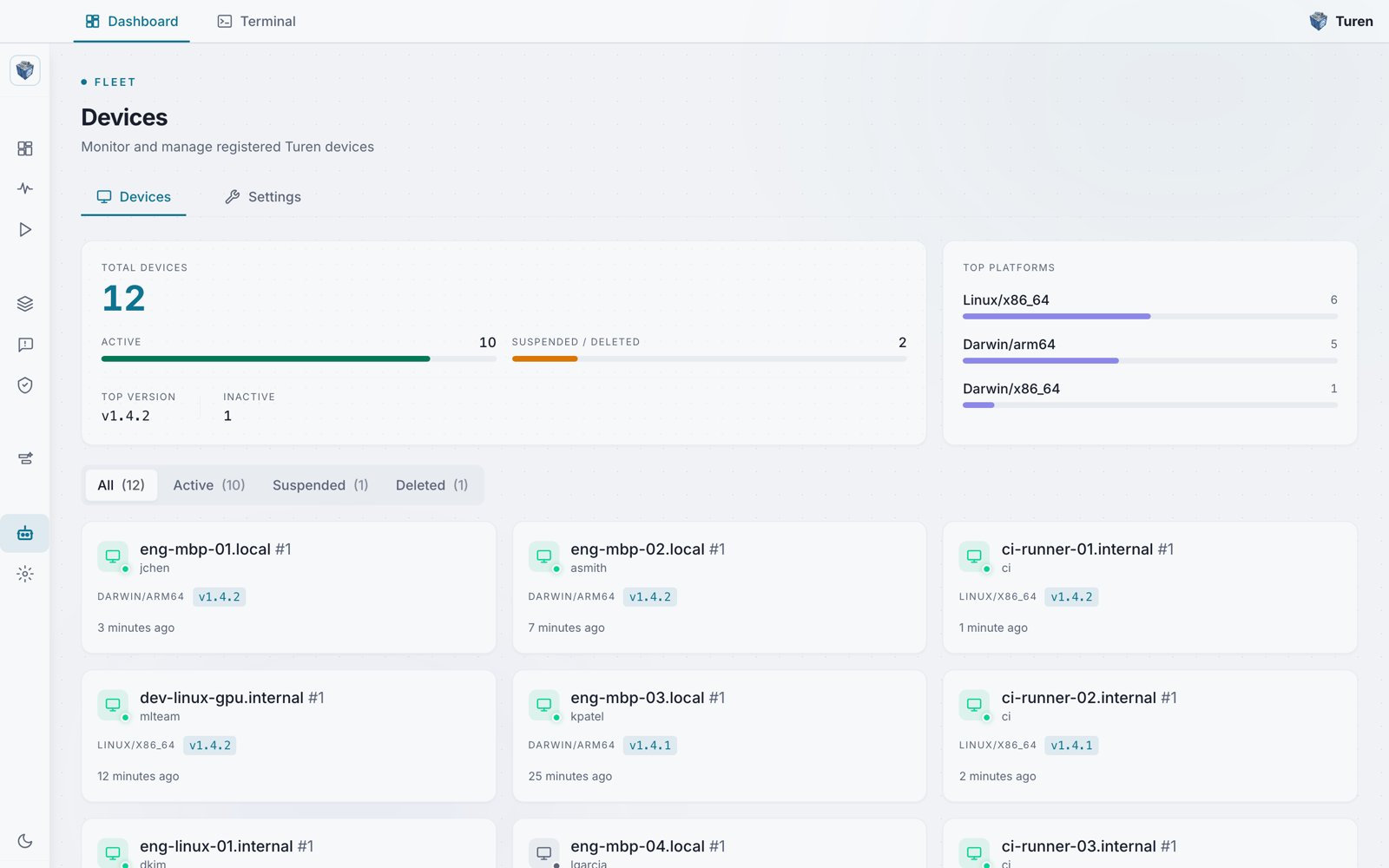
The Devices fleet view: summary metrics, a platform breakdown, status filter tabs, and per-device cards.
Fleet View
The fleet view at/agents shows all registered devices with stats and management controls.
Agent Download
Download the agent installer directly from the dashboard from the Devices page. The download section is organized by operating system (macOS, Linux, and Windows) and detects the visitor’s CPU architecture, including Windows on ARM (via User-Agent Client Hints), so the primary button offers the matching installer:
The installers bundle the desktop app together with the managed agent, so signing in after install registers the machine (no registration key required). For servers and headless machines, use the shell install command shown in the Linux section.
Stats Row
Summary panels at the top of the page break down your fleet:- Total Devices: Number of registered devices
- Active: Devices with active status, shown with a fill bar
- Suspended / Deleted: Combined count of suspended or deleted devices
- Top Version: The most common agent version across the fleet
- Inactive: Devices that have not checked in recently
- Top Platforms: A breakdown of the fleet by OS and architecture (for example Linux/x86_64 and Darwin/arm64)
Device Cards
Devices are shown as a responsive grid of per-device cards rather than a table. Each card shows:- The machine hostname
- The user
- The platform and architecture (for example DARWIN/ARM64 or LINUX/X86_64)
- The agent version
- The last check-in time
Filtering
Use the status filter tabs to show:- All: Every registered device (with count)
- Active: Devices with active status (with count)
- Suspended: Devices that have been manually suspended (with count)
- Deleted: Devices that have been soft-deleted (with count)
Device Detail
Click on any device to view its full details at/agents/:clientId:
- Hostname, username, and platform information
- GPU details
- Registration date and the registration key used, if one was (keyless desktop sign-ins register without a key)
- Client ID and machine ID
- Agent version and generation
- Clone detection status (flags if the agent appears to be running in a cloned VM/container)
Device Status
Devices have the following statuses:
An active device may also show as online or offline based on whether it has checked in within the last hour.
Suspending a Device
If you need to temporarily disable a device, for example during an investigation, you can suspend it:- Go to Platform Settings > Devices
- Click on the device (or use the inline action button)
- Click Suspend Device
Deleting a Device
To remove a device from your organization:- Go to Platform Settings > Devices
- Click on the device
- Click Delete Device
Update Channel Settings
The Turen agent updates itself automatically. You can control how updates are delivered to your fleet from Platform Settings > Device Settings.Release Channels
Choose which release track your agents follow:Version Offset
Set a version offset (0–5) to keep your agents a set number of releases behind the latest version on the selected channel. This gives you a buffer to evaluate new releases before they roll out to your fleet. For example, with the production channel and a version offset of 2, your agents will run the version that is two releases behind the latest production release.Pinned Version
If you need to lock your fleet to a specific agent version, for example during a compliance freeze or while troubleshooting, enter the exact version number (e.g.,v0.1.30) in the pinned version field. Agents will stay on this version until the pin is removed.
How Auto-Updates Work
- On each checkin, the agent checks for a newer version based on your channel, offset, and pin settings.
- If an update is available, the agent downloads and verifies the new version.
- The agent applies the update and restarts automatically.
- If the new version fails to start, the agent rolls back to the previous working version.
Registration Keys
Registration keys for onboarding new machines can be managed under Platform Settings > Devices > Settings (/agent-control/settings). See Registration Keys for detailed documentation.