

handoff_session tool once. TurenOS creates a root session, durably admits the brief as its first message, and starts it immediately. The new session appears in the Agents left navigation and runs independently.
UI path
- Open any session in the app.
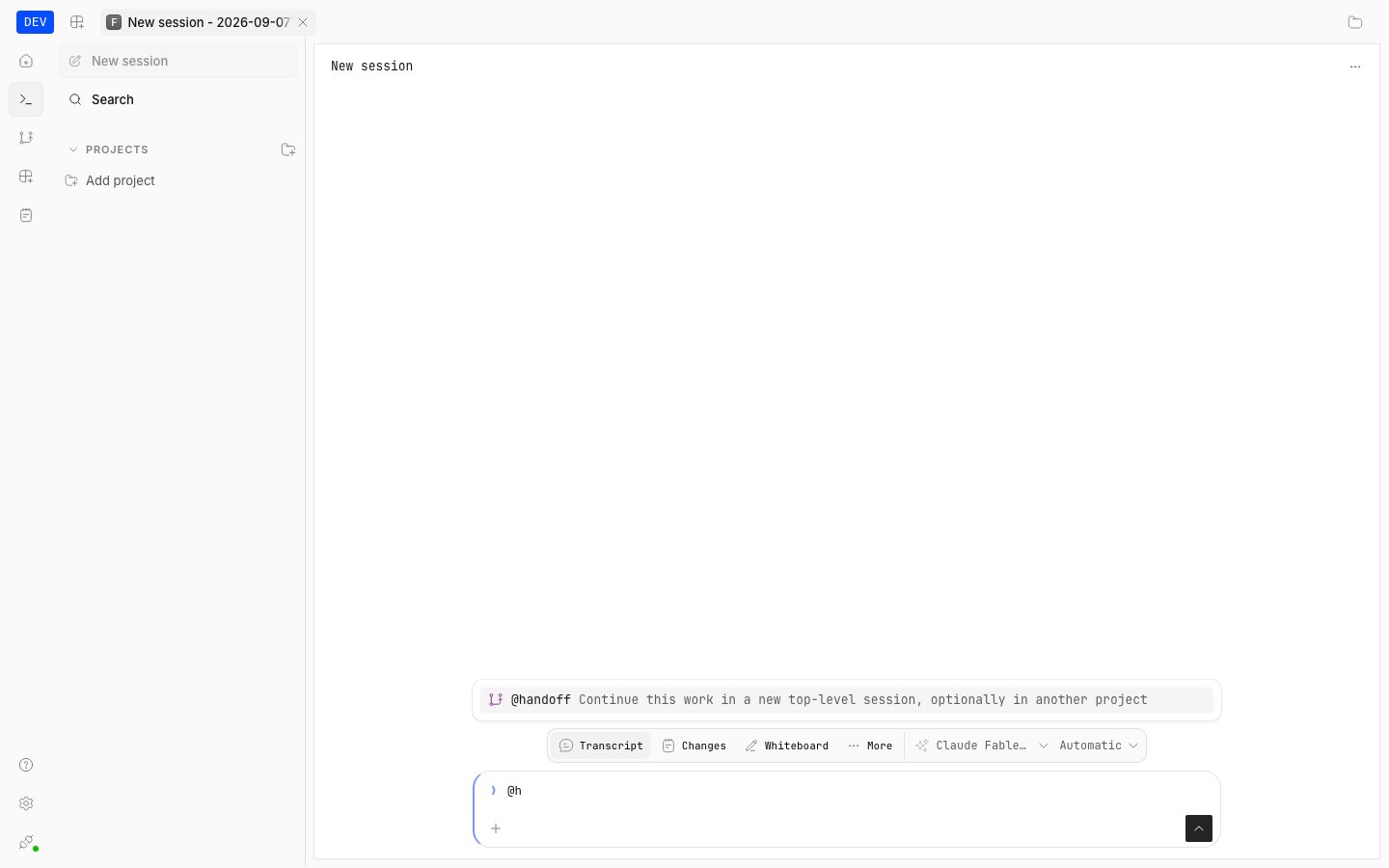
- In the session composer, type
@— the @-menu listshandoffwith the description “Continue this work in a new top-level session, optionally in another project”. - Select
@handoffand describe what should continue (and, if relevant, name another project directory). - The agent writes a continuation brief covering the objective, progress, decisions, relevant files, checks run, blockers, and exact next steps, then calls
handoff_sessiononce with a concise title and that complete brief as the prompt.
When to use it
- Use handoff when the current work should continue in a separate session: context is getting long, work moves to another project directory, or you want a clean session with a written brief while the old session stays as history.
- Stay in this session when the task is small and context is fresh — handoff costs a new session and requires a complete brief.
- Do not use
spawn_agentfor this request. Subagents are children of the current task; handoff is a root session with no parent task. - Do not use
@automationsfor this request. Automations are durable scheduled workflows that repeat on their own; handoff is a one-shot immediate continuation, never scheduled.
Usage
The tool uses the current project, agent, and resolved model unless you explicitly name another project directory. When a destination project is specified, its absolute path is passed as the optionalproject argument; otherwise project is omitted to preserve the current-project behavior.
title(required): short title for the new session, up to 200 characters. It cannot be empty.prompt(required): the complete standalone continuation brief — objective, progress, decisions, relevant files, checks run, blockers, and next steps. Up to 256,000 characters. It cannot be empty.project(optional): absolute path of the destination project directory. Omit it to stay in the current project.
session_id and message_id plus its title and directory.
Limits
- Handoff is unavailable in task-owned sessions (subagent children cannot hand off further).
- Handoff requires the
handoff_sessionpermission; a denial fails the call without creating anything. - A named
projectmust resolve to an existing directory, otherwise the call fails. Directories outside the current project additionally require external-directory permission. - The new session always inherits the current agent and resolved model.
- Calls are idempotent per originating message: retrying the same handoff reuses the same session and brief rather than creating duplicates.