> ## Documentation Index
> Fetch the complete documentation index at: https://docs.turen.io/llms.txt
> Use this file to discover all available pages before exploring further.
# Session Replay
> Review and audit complete Claude Code sessions
Session Replay lets you browse, search, and replay every Claude Code session across your organization. It's your complete audit trail for AI agent activity.
Session Replay is available on both plans. **Solo** retains sessions for 7 days; **Teams** retains them for 30 days.
## Browsing Sessions
Navigate to **Monitor > Session Replay** in the sidebar. The session browser includes:
* **Contribution graph**: A GitHub-style activity calendar heatmap showing session activity over time
* **Stats cards**: Total sessions, total messages, total tokens, and average duration
* **FilterSearch**: An AWS EC2-style multi-category filter for narrowing down sessions
* **Client/device filter**: Filter sessions by specific machines in your fleet
* **Paginated list**: Infinite scroll with session metadata
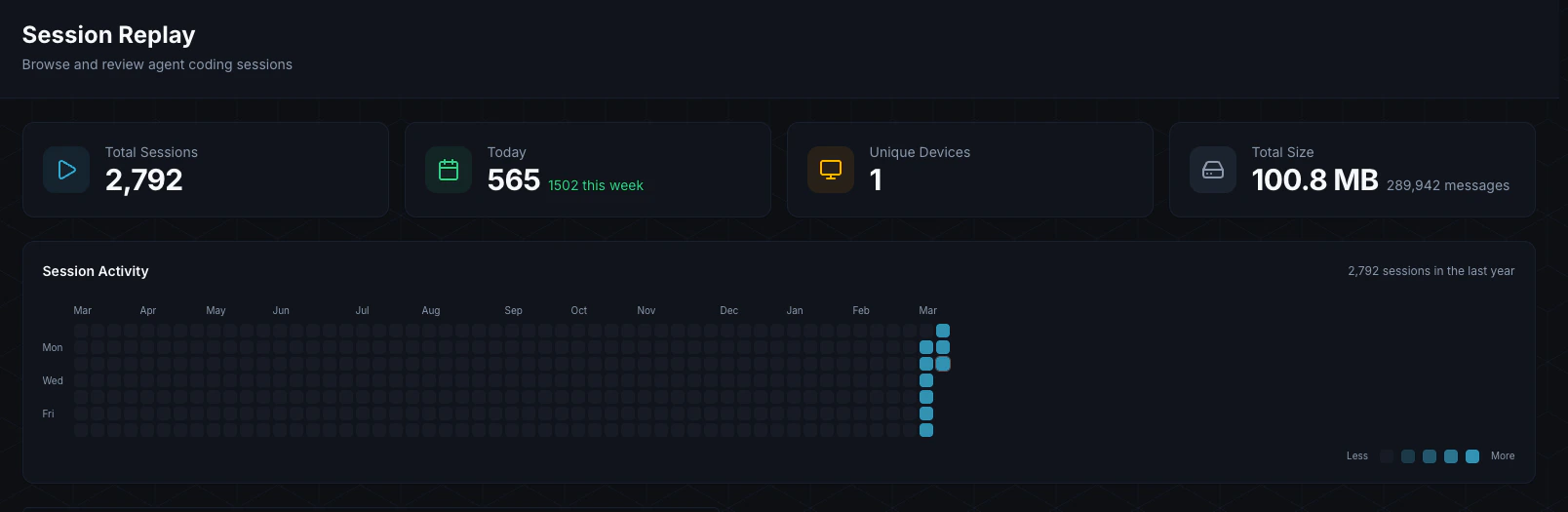 Each session row shows:
| Field | Description |
| ------------ | ---------------------------------------- |
| **Agent** | Which machine ran the session (hostname) |
| **Project** | The working directory/project name |
| **Started** | When the session began |
| **Duration** | How long the session lasted |
| **Messages** | Number of conversation messages |
### Subagent Expansion
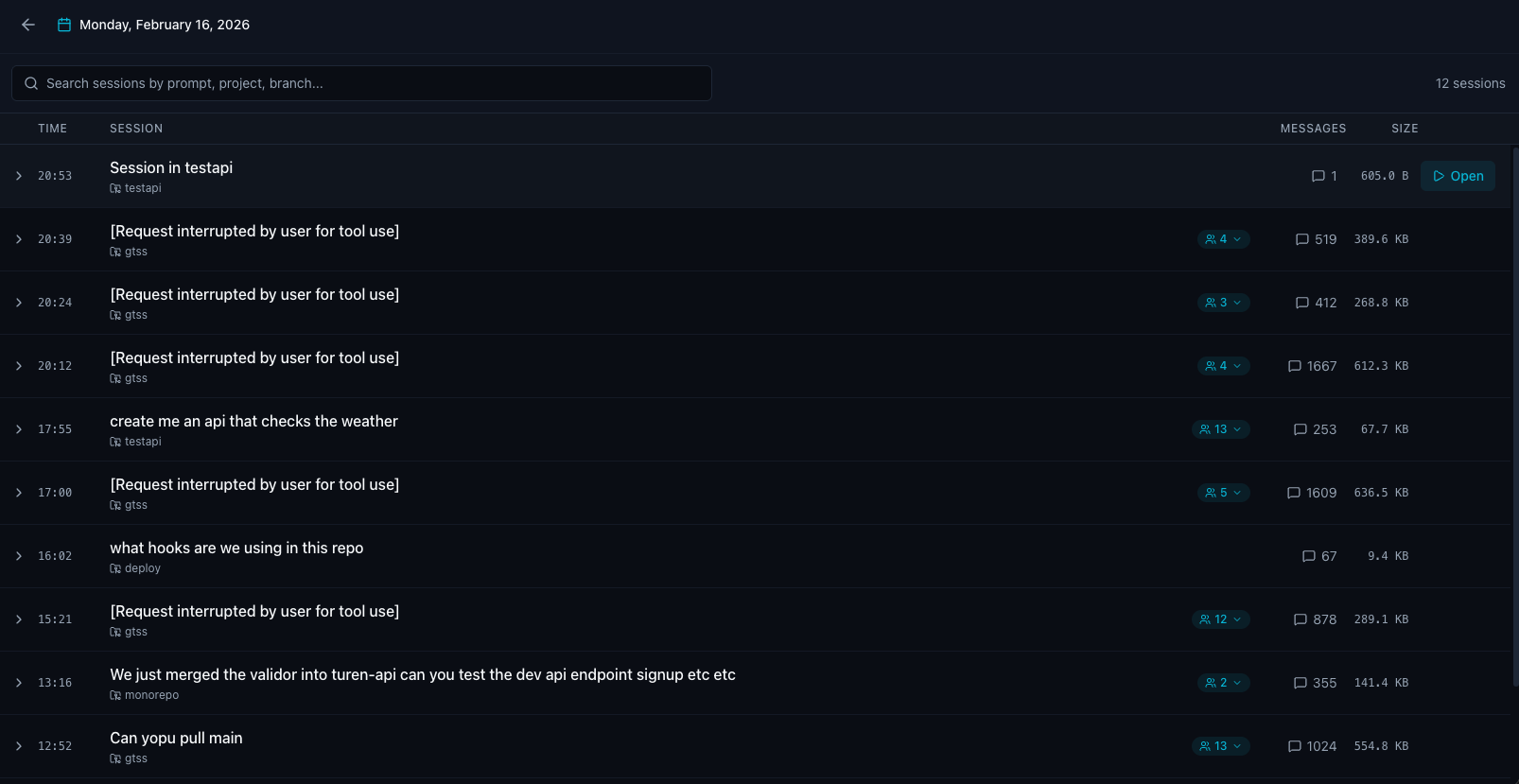
Sessions that spawned subagents show an expand button. Click it to reveal inline subagent rows beneath the parent session, letting you drill into the full agent tree without leaving the list view.
Each session row shows:
| Field | Description |
| ------------ | ---------------------------------------- |
| **Agent** | Which machine ran the session (hostname) |
| **Project** | The working directory/project name |
| **Started** | When the session began |
| **Duration** | How long the session lasted |
| **Messages** | Number of conversation messages |
### Subagent Expansion
Sessions that spawned subagents show an expand button. Click it to reveal inline subagent rows beneath the parent session, letting you drill into the full agent tree without leaving the list view.
 ## Session Detail
Click on any session to open the detail view at `/replay/:sessionId`. The detail page has three main panels:
### Left Sidebar
A collapsible session list panel that lets you navigate between sessions without returning to the list view.
### Main Content
The conversation trace, with two view modes:
* **Dev view**: Full developer-oriented view showing all message types
* **Audit view**: Filtered view focused on security-relevant events
Each entry in the trace is color-coded by type:
| Type | Description |
| ------------- | -------------------------------------- |
| **User** | Human input messages |
| **Assistant** | Claude responses |
| **Tool** | Tool invocations and results |
| **Thinking** | Model thinking/reasoning blocks |
| **Progress** | Progress updates (hooks, agent spawns) |
| **System** | System messages |
| **Summary** | Conversation summaries |
| **Snapshot** | State snapshots |
Use the **FilterSearch** bar to filter the trace by entry type, or search for specific content.
### Right Panel (Inspector)
A collapsible inspector panel with three tabs:
* **Content**: Full content of the selected message
* **Diff**: File diffs for tool calls that modified files
* **Meta**: Metadata including timestamps, token counts, and model info
### CSV Export
Export the full session trace as a CSV file for offline analysis or compliance reporting.
### Streaming
Session content is loaded via Server-Sent Events (SSE), so large sessions stream in progressively rather than blocking on a full download.
## Use Cases
Review sessions where security rules were triggered to understand what happened and whether the response was appropriate.
After a security incident, replay the exact session to understand the chain of events.
Share effective sessions with your team as examples of good agent-assisted development.
Demonstrate to auditors that AI agent activity is logged and reviewable.
## Data Retention
Session data is encrypted at rest with your organization's unique encryption key. Retention depends on your plan:
* **Solo**: 7 days
* **Teams**: 30 days
Contact us if you need custom retention policies.
## Session Detail
Click on any session to open the detail view at `/replay/:sessionId`. The detail page has three main panels:
### Left Sidebar
A collapsible session list panel that lets you navigate between sessions without returning to the list view.
### Main Content
The conversation trace, with two view modes:
* **Dev view**: Full developer-oriented view showing all message types
* **Audit view**: Filtered view focused on security-relevant events
Each entry in the trace is color-coded by type:
| Type | Description |
| ------------- | -------------------------------------- |
| **User** | Human input messages |
| **Assistant** | Claude responses |
| **Tool** | Tool invocations and results |
| **Thinking** | Model thinking/reasoning blocks |
| **Progress** | Progress updates (hooks, agent spawns) |
| **System** | System messages |
| **Summary** | Conversation summaries |
| **Snapshot** | State snapshots |
Use the **FilterSearch** bar to filter the trace by entry type, or search for specific content.
### Right Panel (Inspector)
A collapsible inspector panel with three tabs:
* **Content**: Full content of the selected message
* **Diff**: File diffs for tool calls that modified files
* **Meta**: Metadata including timestamps, token counts, and model info
### CSV Export
Export the full session trace as a CSV file for offline analysis or compliance reporting.
### Streaming
Session content is loaded via Server-Sent Events (SSE), so large sessions stream in progressively rather than blocking on a full download.
## Use Cases
Review sessions where security rules were triggered to understand what happened and whether the response was appropriate.
After a security incident, replay the exact session to understand the chain of events.
Share effective sessions with your team as examples of good agent-assisted development.
Demonstrate to auditors that AI agent activity is logged and reviewable.
## Data Retention
Session data is encrypted at rest with your organization's unique encryption key. Retention depends on your plan:
* **Solo**: 7 days
* **Teams**: 30 days
Contact us if you need custom retention policies.